 on the vertical icon
bar. The Pricing Options window displays:
on the vertical icon
bar. The Pricing Options window displays:To access Store Level Options/Pricing:
1. Click Store Control, Store Level Options.
2. The Store Level Options/Systems window displays.
3. Click on the vertical icon
bar. The Pricing Options window displays:
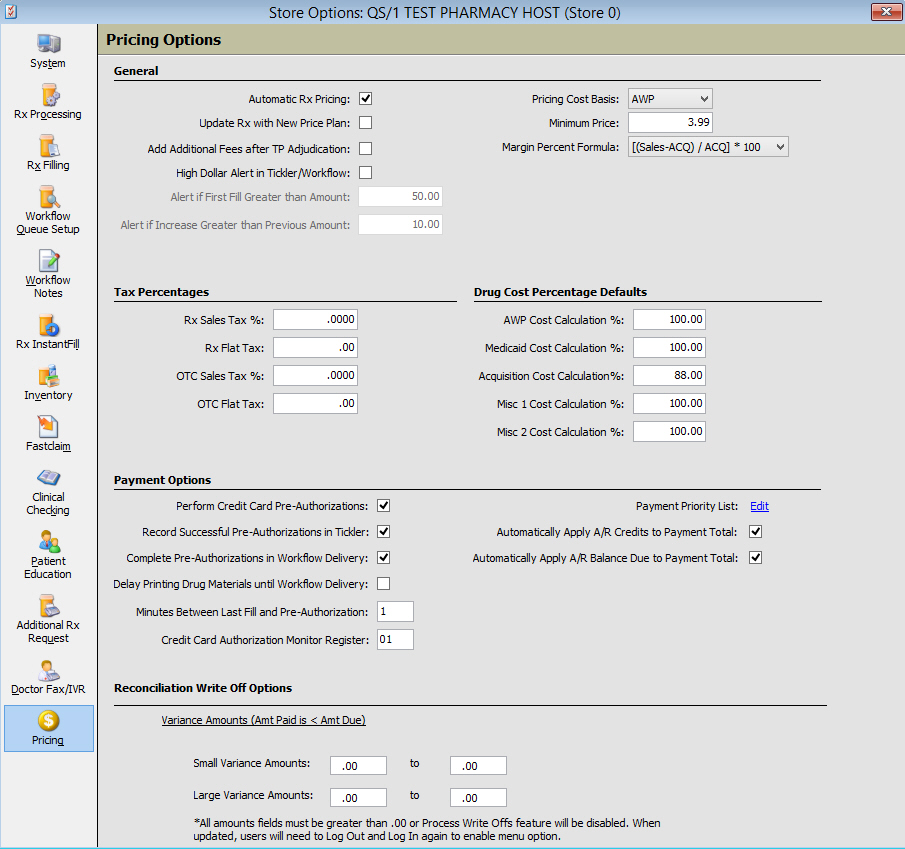
4. Use the definitions below to determine how to set the options:
| STORE CONTROL | |
| STORE LEVEL OPTIONS/PRICING | |
| General | |
| Field Name | Field Definition |
| Automatic Rx Pricing | Check this option and the following rules apply:
|
| Update Rx with New Price Plan | Check this option and the system automatically updates the Rx Record with the Primary Price Plan associated with the Drug Record unless filling for a Third Party or Medicaid Price Plan. |
| Pricing Cost Basis | Select the cost basis for pricing from the drop-down. |
| Minimum Price | Type the minimum price to charge for all prescriptions. |
| Margin Percent Formula | Select the margin percent formula to use for calculations on reports. |
| Add Additional Fees after TP Adjudication | |
| Tax Percentages | |
| Rx Sales Tax % | Type the sales tax for prescriptions in your state/county. |
| Rx Flat Tax | Type the amount of the flat tax rate for prescriptions in your state/county. |
| OTC Sales Tax % | Type the sales tax % for OTC items processed as prescriptions in your state/county. |
| OTC Flat Tax | Type the flat tax rate for OTC items processed as prescriptions in your state/county. |
| Drug Cost Percentage Defaults | |
 Payment
Options (instead of Drug Cost Percentage Defaults)
display if you have QS/1 Point-of-Sale and the Rxpress Module. Payment
Options (instead of Drug Cost Percentage Defaults)
display if you have QS/1 Point-of-Sale and the Rxpress Module.
|
|
| AWP Cost Calculation % | Type the percentage to use to calculate the AWP cost of a drug. This figure is the default value in the AWP field on each Drug Record. |
| Medicaid Cost Calculation % | Type the percentage to use to calculate the Medicaid cost of a drug. This figure is the default value in the Medicaid Pct field on each Drug Record. |
| Acquisition Cost Calculation % | Type the percentage to use to calculate the Acquisition cost of a drug. This figure is the default value in the Acquisition field on each Drug Record. |
| Misc 1 Cost Calculation % | Type the percentage to use to calculate the Miscellaneous 1 Cost of a drug. This figure is the default value in the Misc 1 field on each Drug Record. |
| Misc 2 Cost Calculation % | Type the percentage to use to calculate the Miscellaneous 2 Cost of a drug. This figure is the default value in the Misc 2 field on each Drug Record. |
| Payment
Options
Added options for credit card functions to Store Control, Store Level Options, Pricing. The options are:
If Perform Credit Card Pre-Authorization is unchecked, all other options are disabled. |
|
| Reconciliation Write Off Options | Write-off
functionality is for Variance Amounts (Amt Paid is < Amt Due)
left when the third party amounts paid are less than the amount
billed from third party reconciliation.
|
Return to Accounts Receivable Overview